GST Invoice Generator — Offline Excel Tool
English
This is a professional GST Invoice Generator built entirely in Excel with VBA macros. Simply enter your business details, add line items with HSN/SAC codes, and the tool auto-calculates CGST, SGST, and IGST based on whether the transaction is intra-state or inter-state. Generate unlimited professional tax invoices and export them as PDF — all 100% offline on your own computer. No internet, no subscription, no data sharing.
Hindi / हिंदी
यह एक प्रोफेशनल GST इनवॉइस जनरेटर है जो पूरी तरह Excel VBA मैक्रोज़ में बना है। बस अपनी व्यवसाय की जानकारी दर्ज करें, HSN/SAC कोड के साथ आइटम जोड़ें, और टूल ऑटोमैटिकली CGST, SGST और IGST की गणना करेगा। असीमित प्रोफेशनल टैक्स इनवॉइस बनाएं और उन्हें PDF के रूप में एक्सपोर्ट करें — सब कुछ 100% ऑफलाइन, आपके अपने कंप्यूटर पर। न इंटरनेट की ज़रूरत, न सब्सक्रिप्शन, न डेटा शेयरिंग।
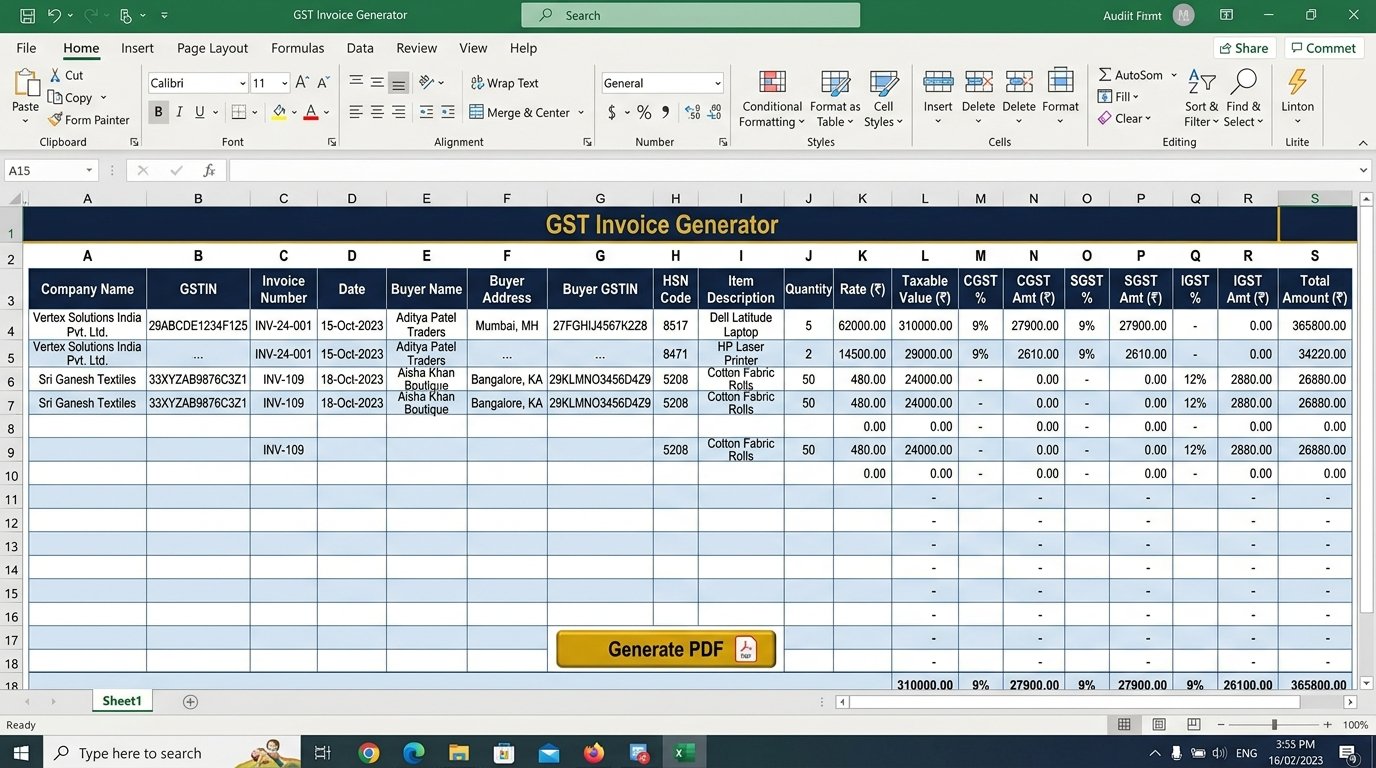
Auto Tax Calculation
CGST, SGST, IGST auto-split based on intra/inter-state supply
HSN/SAC Support
Include HSN/SAC codes for every line item as per GST rules
PDF Export
One-click professional invoice PDF generation
100% Offline
No internet, no cloud, no data leaves your computer
How to Unblock the Excel File (एक बार सेटअप निर्देश)
What is a GST Invoice Generator?
A GST Invoice Generator is a tool that creates professional, legally-compliant tax invoices as per GST rules and regulations. This free offline Excel tool (.xlsm) by CA Piyush Gupta Sir uses VBA macros to automate the entire invoice creation process — from auto-calculating CGST, SGST, and IGST based on intra-state or inter-state supply, to including HSN/SAC codes for every line item. Unlike cloud-based billing software that requires monthly subscriptions and stores your business data on external servers, this tool runs 100% offline on your own computer using Microsoft Excel. Generate unlimited professional tax invoices and export them as PDF with one click — no internet required, no data sharing, zero subscription fees.
Mandatory Fields in a GST Tax Invoice
| Field | Description | Rule Reference |
|---|---|---|
| Supplier GSTIN | 15-digit GST Identification Number of the seller | Rule 46(a) CGST Rules |
| Invoice Number | Unique sequential number, max 16 characters | Rule 46(b) CGST Rules |
| Date of Issue | Invoice date (within 30 days of supply for services) | Section 31 CGST Act |
| Buyer GSTIN | Recipient's GSTIN (if registered under GST) | Rule 46(e) CGST Rules |
| HSN/SAC Code | Harmonized System of Nomenclature code for goods / SAC for services | Rule 46(f) CGST Rules |
| Taxable Value | Value of goods/services before tax | Rule 46(h) CGST Rules |
| CGST/SGST/IGST | Tax amounts split by type (intra-state vs inter-state) | Rule 46(i)(j)(k) CGST Rules |
| Place of Supply | State where goods/services are delivered | Section 10/12 IGST Act |
Note: This tool auto-fills all mandatory fields. HSN code requirement depends on aggregate turnover — mandatory for turnover above ₹5 crore (4-digit HSN) and above ₹10 crore (6-digit HSN).
❓ Frequently Asked Questions (FAQ)
What is a GST Invoice Generator Excel tool?
It's a macro-enabled Excel workbook (.xlsm) that automatically generates professional GST-compliant tax invoices. It auto-calculates CGST, SGST, and IGST based on supply type (intra-state or inter-state), includes HSN/SAC codes, and exports invoices as PDF — all 100% offline without any internet connection.
Is this GST invoice tool free to download?
Yes, completely free. No registration, no subscription, no hidden fees. Download the .xlsm file and start generating invoices immediately. The tool is created by CA Piyush Gupta Sir as a free resource for accountants, small businesses, and tax professionals.
Does it work offline without internet?
Yes, 100%. The tool uses Excel VBA macros and does not require any internet connection. Your invoice data stays securely on your own computer. No cloud storage, no external servers, no data sharing — complete privacy for your business billing information.
What Excel version is required?
Microsoft Excel 2010 or later on Windows. Excel must support macros (.xlsm files). After downloading, you may need to right-click the file, go to Properties, check the "Unblock" checkbox, and then enable macros when opening the file. See the unblock instructions above for a step-by-step guide.
Is the invoice format GST compliant?
Yes. The generated invoices include all mandatory fields as per GST rules (Rule 46 of CGST Rules): Supplier & Buyer GSTIN, HSN/SAC codes, taxable value, CGST/SGST/IGST amounts, invoice number, date, and place of supply. The format is accepted for filing GSTR-1 and claiming Input Tax Credit.